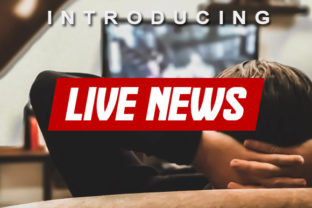
Live News: A Unique Display Font for Dynamic Headlines and Text
When it comes to typography, the right font can make all the difference in how your message is received. Live News stands out as a unique display font that offers versatility, style, and clarity across various media. Whether you're designing a website, creating print materials, or working on motion graphics, this font delivers a professional and eye-catching result. But like any tool, using Live News effectively requires understanding its strengths and avoiding common pitfalls.
What Is Live News?
Live News is a display font designed with boldness and readability in mind. It features sharp lines, dynamic shapes, and a modern aesthetic that makes it ideal for headlines, banners, and attention-grabbing text. Its structure allows for both maximum and minimum variations, making it suitable for everything from large title blocks to smaller, more intricate details.
This font works well in digital environments such as websites and social media posts, but it also performs admirably in print, signage, and even animated projects. The key to success with Live News lies in knowing when and where to use it appropriately.
Common Mistakes When Using Live News
While Live News is visually striking, some users may misuse it, leading to poor design choices. Here are a few common mistakes to avoid:
- Using It for Long Blocks of Text: Live News is best suited for short, impactful phrases rather than long paragraphs. Using it for extended text can lead to visual fatigue and reduced readability.
- Ignoring Contrast: Pairing Live News with the wrong background color or text color can diminish its effectiveness. Ensure there's enough contrast between the font and the surrounding elements.
- Overusing It: While it's tempting to apply Live News everywhere, overuse can dilute its impact and make your design look cluttered.
- Not Testing It Across Devices: How Live News appears on a desktop may differ from how it looks on mobile screens. Always test your designs on multiple devices before finalizing them.
How These Mistakes Affect Your Design
Misusing Live News can lead to several issues. For instance, if you use it for long blocks of text, readers may find it difficult to follow, which could reduce engagement. Poor contrast might make your content hard to read, especially for people with visual impairments. Overusing the font can confuse your audience and weaken your brand identity. Lastly, not testing it across devices can result in a subpar user experience, potentially driving away visitors.
Practical Tips for Using Live News Effectively
To ensure that Live News enhances your design rather than detracts from it, consider these tips:
- Use It for Headlines Only: Reserve Live News for titles, headers, and other short text elements. This preserves its visual impact without compromising readability.
- Pair It with Complementary Fonts: Use Live News alongside a clean, sans-serif font for body text. This combination ensures that your design remains balanced and easy to read.
- Experiment with Color and Background: Try different color combinations to see what works best for your project. Tools like Adobe Color can help you find harmonious palettes.
- Limit Usage to Key Elements: Apply Live News selectively—perhaps only on your main headline or call-to-action buttons. This helps maintain focus and prevents visual overload.
- Test on Multiple Platforms: Before launching your project, check how Live News appears on different devices and screen sizes. Adjust spacing, size, and color as needed to ensure consistency.
Real-World Examples of Live News in Action
Imagine you're designing a news website. Using Live News for your main headline will immediately grab attention, while a simpler font like Arial or Helvetica can be used for the rest of the content. Similarly, if you're creating a promotional poster, Live News can serve as the primary text for your event name, while supporting text uses a more legible font.
For a marketing campaign, Live News could be used on social media banners or email headers to stand out in a crowded feed. Just be sure to keep the rest of the content simple and clear so that the message isn't lost in the design.
What to Check Before Choosing Live News
Before committing to Live News, take a moment to evaluate whether it fits your needs. Ask yourself the following questions:
- Is my project primarily text-based, or do I need a font that can handle dynamic visuals?
- Will this font work well with my brand’s overall style and color scheme?
- Do I have access to the font in the format I need (web, print, etc.)?
- Are there licensing restrictions that could affect how I use it?
Checking these factors can save you time and prevent potential issues down the line. If you're unsure, try downloading a free version or demo of Live News to experiment with it before making a final decision.
In conclusion, Live News is a powerful and versatile font that can elevate your design when used correctly. By avoiding common mistakes and applying practical tips, you can ensure that your projects look professional and engaging. Whether you're a designer, marketer, or content creator, taking the time to understand how to use Live News effectively will pay off in the quality and impact of your work.