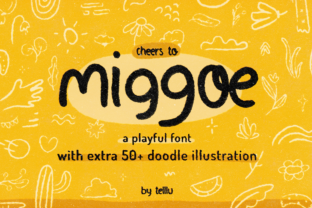
Miggoe: A Playful Handwritten Font for Educational and Creative Projects
Miggoe is a playful and casual handwritten font that brings a friendly, approachable feel to any design. Its soft curves and natural flow make it ideal for educational materials, creative projects, and brand identities that want to convey warmth and personality. Unlike more formal or rigid typefaces, Miggoe mimics the look of handwriting, which can help create a sense of connection and engagement with the audience.
Understanding the Role of Miggoe in Design Workflows
Incorporating Miggoe into your workflow requires understanding where it fits best. It's not a font for every situation, but when used correctly, it can enhance the visual appeal and emotional impact of your work. Typically, Miggoe works well in situations where the tone needs to be light, conversational, or inviting.
Before starting a project, consider whether Miggoe aligns with your overall design goals. If you're creating content for children, educators, or casual brands, Miggoe could be an excellent choice. It adds character without overwhelming the message. However, if your project requires professionalism or clarity, it might be better to pair Miggoe with a more structured sans-serif font for headings or body text.
Using Miggoe During the Design Process
During the design phase, Miggoe can serve as a tool to express creativity and personality. It’s particularly useful for titles, headers, and callout sections where you want to draw attention or add a touch of whimsy. For example, in a presentation about learning techniques, using Miggoe for the title slide can immediately set a friendly and encouraging tone.
When working with digital tools like Canva, Adobe Illustrator, or Photoshop, ensure that Miggoe is installed and accessible within your software. Many of these platforms allow you to import custom fonts, so having Miggoe available in your font library will streamline the process. Additionally, check that the font size and spacing are optimized for readability, especially on screens or printed materials.
It’s also important to consider how Miggoe interacts with other elements of your design. Since it has a more organic feel, pairing it with clean, modern layouts can create a nice contrast. Avoid using it in large blocks of text, as this can reduce legibility and distract from the main message.
Practical Use Cases for Miggoe
Miggoe’s versatility makes it suitable for various use cases across different industries. Here are a few practical examples of how it can be integrated into your work:
- Educational Materials: Miggoe can be used in worksheets, flashcards, or lesson plans to make learning more engaging. The font's friendly appearance helps create a welcoming environment for students.
- Creative Projects: Whether you're designing a poster, greeting card, or social media graphic, Miggoe adds a personal touch that can stand out in a sea of generic content.
- Brand Identity: Small businesses looking to build a warm and relatable brand image can benefit from using Miggoe in logos, packaging, or marketing collateral.
- Personal Goals and Productivity: If you're tracking progress or creating habit logs, Miggoe can make the process more enjoyable and visually appealing.
Integrating Miggoe with Other Tools and Resources
To maximize the effectiveness of Miggoe, it’s essential to understand how it integrates with other design tools and resources. Many online platforms offer font pairing suggestions, which can help you find complementary fonts that balance the playful nature of Miggoe with the need for clarity and professionalism.
Additionally, consider using tools like FontPair or Typography.com to explore different combinations. These resources can guide you in selecting fonts that work well together, ensuring that your final design looks cohesive and polished.
When using Miggoe in digital formats, always test how it appears on different devices and screen sizes. This ensures that your designs remain consistent and readable across all platforms. Similarly, if you’re printing materials, make sure that Miggoe prints clearly and doesn’t lose its charm due to low resolution or poor scaling.
Workflow Tips for Using Miggoe Effectively
Implementing Miggoe into your workflow smoothly requires some preparation and planning. Here are a few tips to help you get started:
- Choose the Right Format: Ensure that you have the correct format of the Miggoe font (usually .ttf or .otf) that is compatible with your design software. Some platforms may require specific file types, so double-check the requirements before downloading.
- Install and Organize: Once you’ve downloaded the font, install it on your computer and organize your font library. This makes it easier to access Miggoe whenever needed and keeps your workspace tidy.
- Test Readability: Before finalizing your design, test how Miggoe looks at different sizes and weights. Adjust the spacing and line height to ensure that the text remains legible and aesthetically pleasing.
- Balance with Other Fonts: While Miggoe adds a friendly touch, it should be balanced with more structured fonts for body text. This creates a harmonious visual hierarchy and prevents the design from feeling too informal.
- Use Sparingly: Miggoe works best when used in moderation. Overusing it can make your design appear cluttered or unprofessional. Focus on key elements like headlines, subheadings, or decorative accents.
By following these tips, you can integrate Miggoe into your workflow without compromising the quality or professionalism of your work. It’s all about finding the right balance between creativity and clarity.
Long-Term Use and Consistency
If you plan to use Miggoe regularly, it’s important to maintain consistency across your projects. Establishing a style guide that includes font usage, color schemes, and layout preferences can help ensure that your designs remain cohesive over time.
Additionally, keep an eye on updates or new versions of Miggoe. Font developers sometimes release improvements or additional styles, which can enhance your design capabilities. Staying informed about these changes allows you to take full advantage of what Miggoe has to offer.
Finally, remember that Miggoe is just one part of your design toolkit. While it can bring a unique personality to your work, it should be used in conjunction with other design principles and tools to achieve the best results.